Skip to main contentLearn about the internal architecture of Kuralit and how all components work together.
System Architecture
The Kuralit system consists of three main components working together:
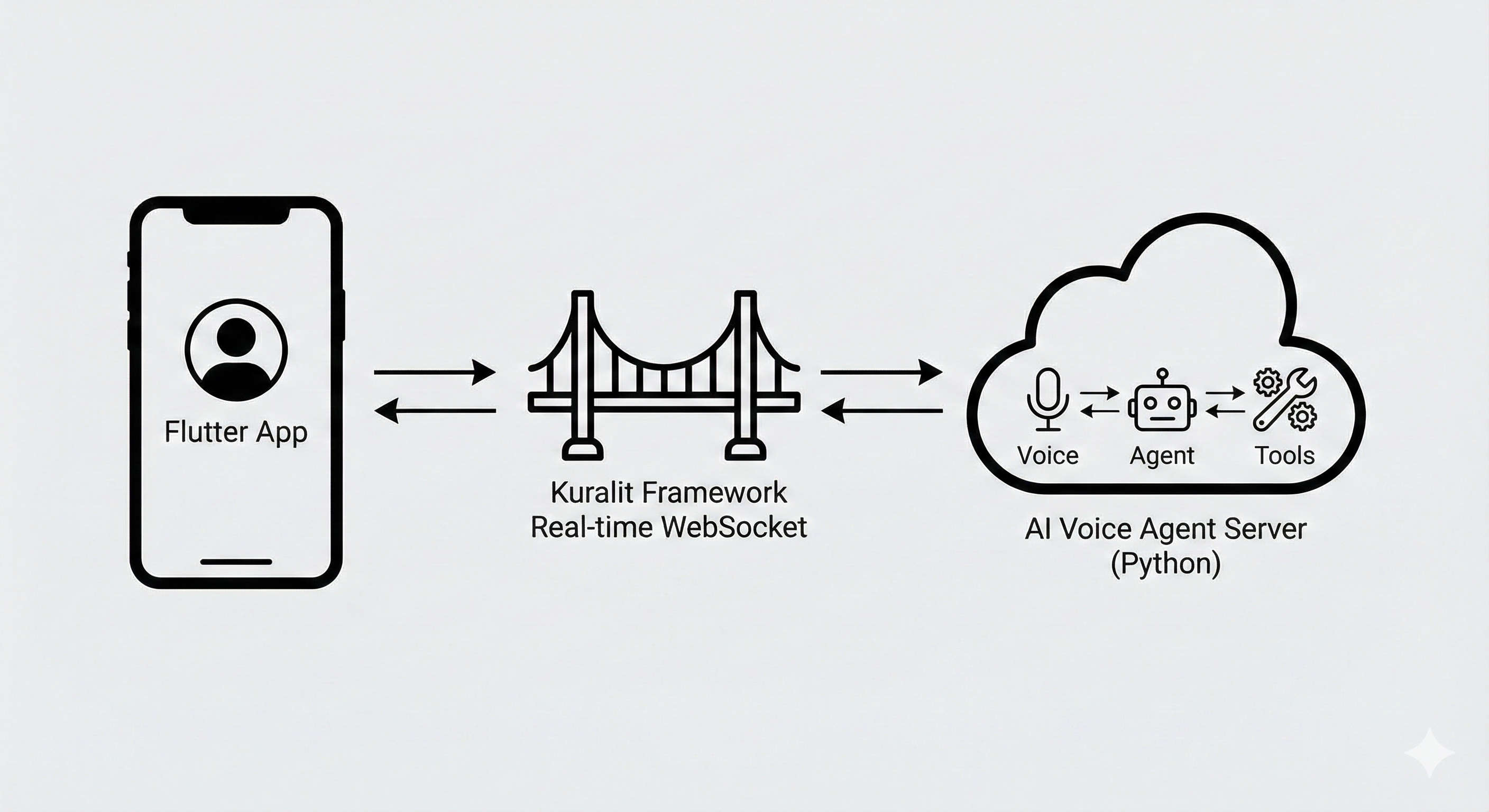
Detailed Architecture Components
Flutter App Layer
 The Flutter application layer handles:
- User interface and interactions
- Real-time WebSocket communication
- Audio capture and streaming
- UI templates and overlays
Kuralit Framework
 The Kuralit Framework provides:
- Real-time WebSocket communication
- Protocol handling
- Event management
- Connection management
AI Voice Agent Server
 The Python-based AI Voice Agent Server includes:
- Voice Processing: Speech-to-text, voice activity detection, turn detection
- AI Agent: Large language model integration and conversation management
- Tools: Function calling and API integration capabilities
Kuralit Dashboard (Optional)
The Kuralit Dashboard is an optional monitoring tool that provides real-time visibility into your AI Voice Agent server:
- Real-time Monitoring: Watch conversations and agent interactions as they happen
- Metrics Dashboard: Track server-wide and session-specific metrics
- Debugging Interface: Inspect conversation history and troubleshoot issues
The dashboard connects to your server via WebSocket and displays real-time updates without requiring server restarts.
Learn more: Dashboard Documentation →
Data Flow
- User Input → Flutter app captures voice/text input
- WebSocket → Real-time communication via Kuralit Framework
- Server Processing → AI Voice Agent processes with Voice + Agent + Tools
- Response → Server sends response back through WebSocket
- Display → Flutter app displays response to user
Component Interactions
- Voice ↔ Agent: Voice input is transcribed and sent to the agent
- Agent ↔ Tools: Agent can call tools (like REST APIs) to perform actions
- Agent ↔ Voice: Agent responses can be converted to voice output
Next Steps

